All the demos, in one place.
CueDesk read three ways — a free read, a content sprint, and a deep read. Pick a depth below.
Deep Read
The hands-on version: everything in the sprint, plus the product walkthrough and marked drop-off points.
Deep Read · CueDesk (sample) · run cuedesk-deep
Your Deep Read.
I walked your product as your target buyer and marked exactly where belief, trust, or momentum leaks. The goal: Get Discord-running SaaS founders to start a private CueDesk workspace — the plan brings them, the page has to earn the click.
The product walk.
I walked CueDesk as a small SaaS founder drowning in repeat Discord questions. The product itself is clean and believable — but from the hero to the paywall it keeps listing features instead of showing me my escape, and it hides its real edge (draft mode = an AI that never speaks a wrong answer in public). Belief leaks at the hero, it asks me to sign up before I’m sold, trust wobbles exactly where it wants access to my Discord, and the free/paid line only lands as a surprise at the gate.
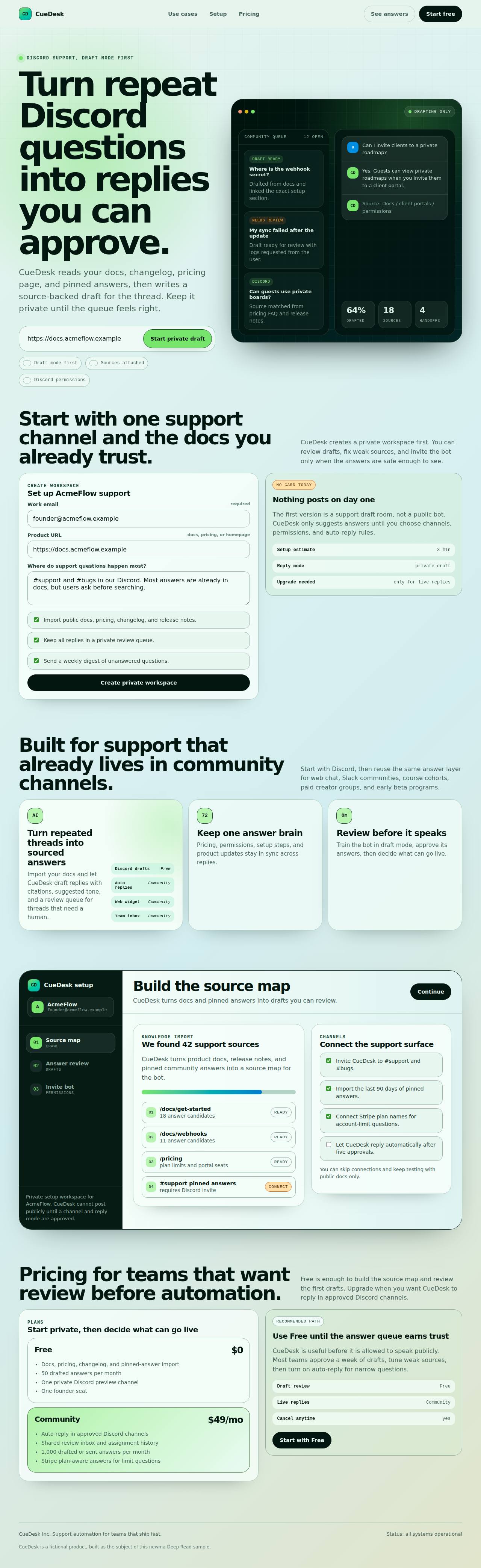
Hidden until you click — the in-product screens
These don’t appear on the page above. They only show up once you click into the product — so I walked each one by hand and marked where it leaks.
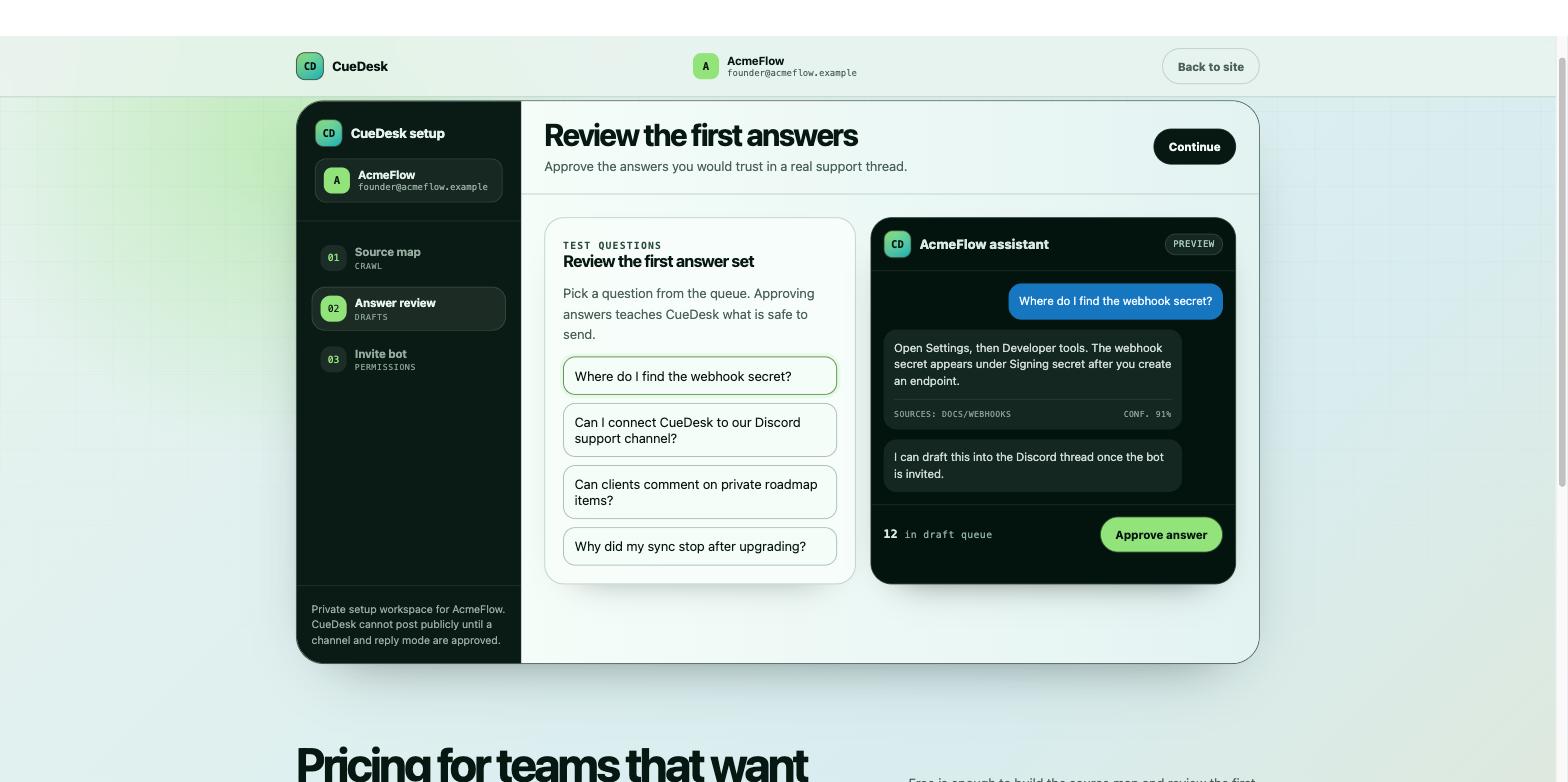 12
12This is the value screen — and it’s exactly where draft mode should be selling itself — but it doesn’t explain the mechanics. I’m left with questions instead of confidence.
Unclear how it actually works: do I pick the queue or does the AI suggest? If it drafts, can I drop in a real customer question, edit the draft, write my own, or ask follow-ups? When I approve, is it fixed text or does it adapt to the asker’s context? Without this, the buyer can’t see how draft-mode training makes CS stronger.
→ Spell out the loop on-screen: pick/route a question → AI drafts with sources → you edit, rewrite, or ask follow-ups → approve → approved answers adapt to context, and each approval trains it.
The first value is a polished internal preview — you don’t see the actual Discord thread, channel permissions, or how the answer sits next to real members. For a Discord-native product, the first ‘aha’ should be the real Discord moment, not a widget.
→ Show the drafted answer inside a realistic Discord thread (channel, members, the reply in context) so the first value is the real thing.
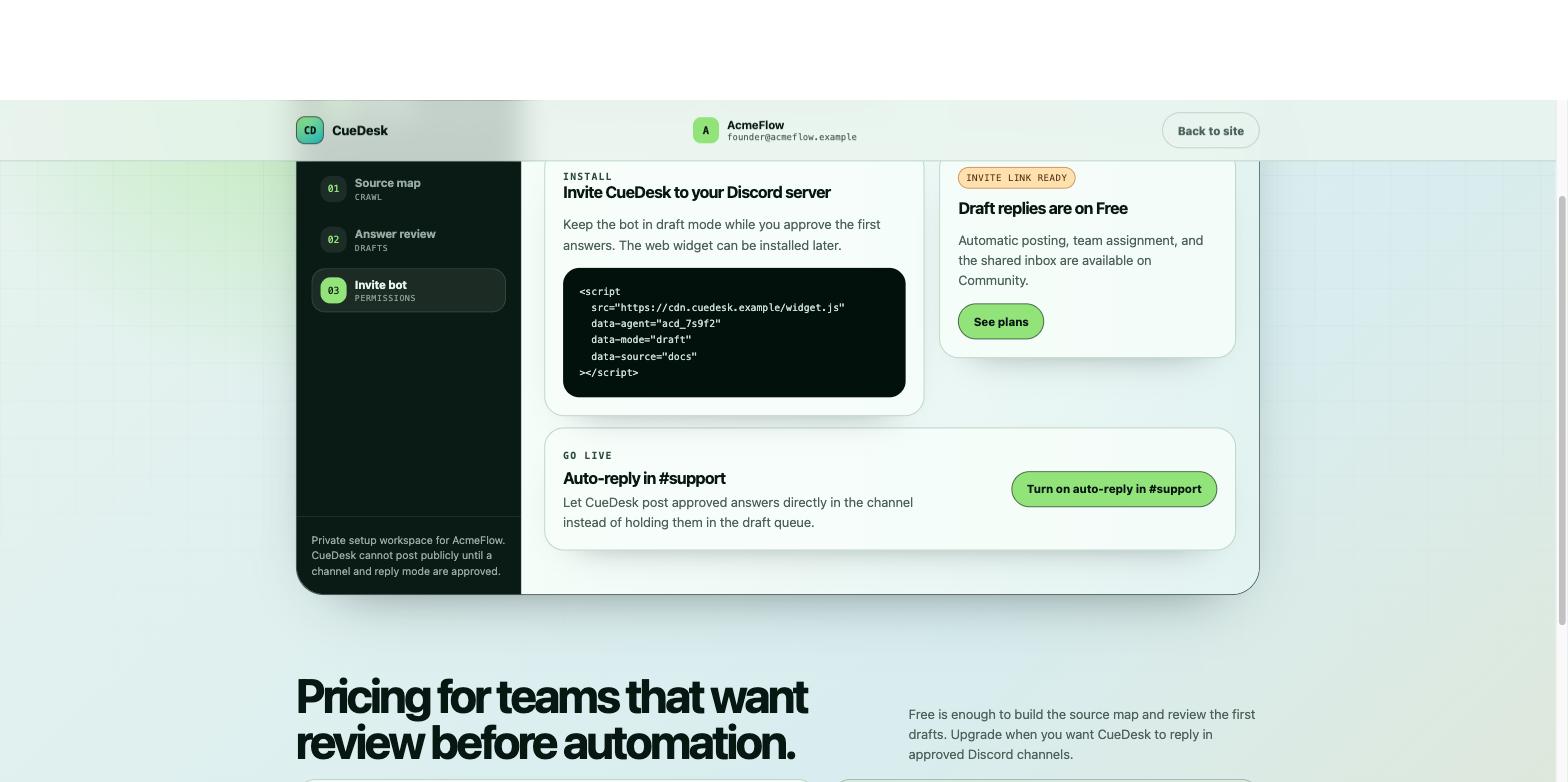 12
12Two problems at once: I’m asked to give a bot access to my Discord with no reassurance it’s safe, and the pricing plan is nudged inside the feature step.
You ask me to invite a bot into my community but never address the obvious fear — is it safe, what can it see, can it post without me? The single biggest trust hurdle is unhandled right where you ask for access.
→ Put the safety story at the invite: draft-only until approved, scoped permissions, exactly what it can and can’t read.
Pricing nudges are mixed into the install/feature step. You already have a pricing section; here they just muddy the feature.
→ Pull all plan/upgrade nudges out of the feature steps and back into pricing.
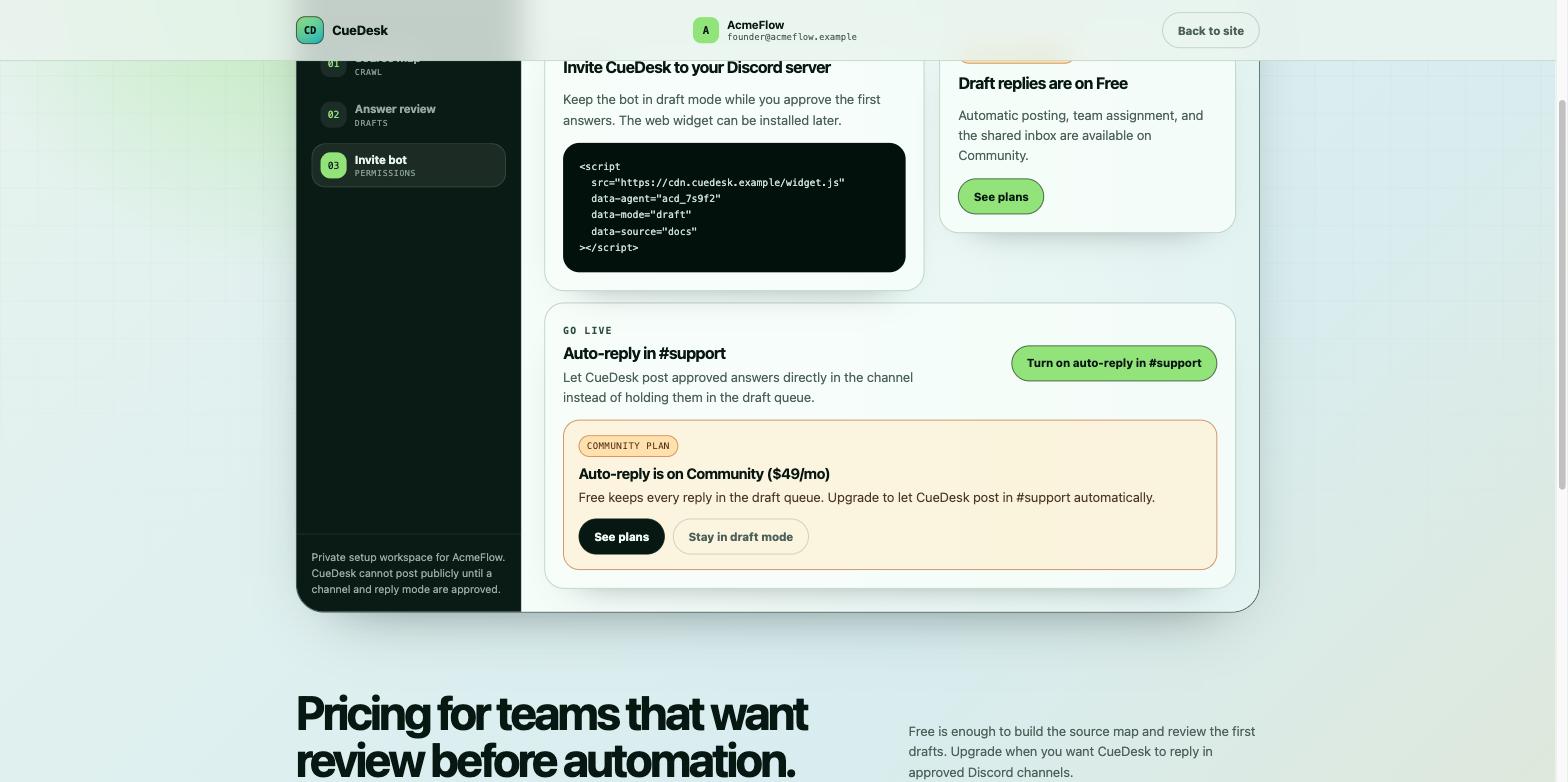 1
1Hitting the auto-reply gate is where I finally understood the model — and that’s the problem. From the hero to here I thought CueDesk only does draft mode. Turns out draft mode is the free plan and the thing that actually relieves support load (auto-reply) is paid. Learning that as a surprise at the wall feels like a bait-and-switch, even though it isn’t.
The free (draft) / paid (auto-reply) boundary is only revealed at the gate. Nothing earlier sets the expectation, so the reveal reads as a surprise at the worst moment.
→ Surface the split in the feature section up front: “Free = a draft queue you approve. Community = CueDesk auto-replies in-channel.” Make the paid value visible early so the gate confirms rather than surprises.
The growth-hacking lens
Turn the concern into the category
Every “AI support bot” competitor auto-sends. Your wedge is the fear they ignore — AI posts wrong answers. Lead the whole site with draft-mode-first as hallucination insurance; it’s the one claim they can’t copy without rebuilding their trust model.
Add an FAQ section
There’s no FAQ. One earns SEO + AI-citation surface and kills the exact objections in this walk (is it safe? can I edit? free vs. paid?). Cheap, compounding, and it does real conversion work.
One page, one job
Setup, connections, and pricing currently bleed into the feature story. Give each feature its own beat, move signup behind the CTA, and keep pricing in the pricing section — so the landing’s only job is to earn the click.
Hand this to your AI page builder. It’s “here’s what a real walkthrough found → research the options and propose”, not “build this” — so the AI sharpens the diagnosis instead of overwriting it.
Fix these first.
The highest-impact leaks from the walk, in priority order — what to change before anything else.
Rewrite the hero around the escape, not the feature
Name who it's for, the pain (answering the same question 12× a day), and the better life (24/7 support answers that never make one up). Put the solution in the subtext. The footer line “Support automation for teams that ship fast” is good raw material to build the promise from.
Landing · the hero reads as a feature note; a busy founder won’t self-translate it into “my life gets better.”Make draft-mode-first the loud, unfakeable wedge
Reframe it as hallucination insurance: nothing wrong ever posts publicly until you approve. Every auto-send competitor ignores this fear — it’s the one claim they can’t copy without rebuilding their trust model.
Landing kicker (“draft mode first”) states the wedge flatly instead of selling it.Move signup behind the CTA
Don’t ask a visitor to create a workspace before they’re convinced. CTA → a dedicated page or modal, so only the curious-and-motivated reach setup. Keep the landing about persuasion.
Signup · the “Create private workspace” form sits inline, before belief is earned.Handle the Discord-access fear at the invite; keep pricing in pricing
Add the safety story exactly where you ask for access — draft-only until approved, scoped permissions, what the bot can and can’t read — and pull every plan/upgrade nudge back into the pricing section.
Invite · the biggest trust hurdle is unaddressed, and pricing nudges muddy the feature step.The plan.
The whole 2 weeks at a glance — week 1 tests the angle, week 2 doubles down on whatever moved. Tap any day to jump to its full playbook + draft.
Earn the room.
Unit 1The 12 questions that ate our DiscordIndie Hackers · Day 2DraftLog your repeat support questions for a week and post the count. Every founder running a community feels this — lead with the receipt, not the product.
Title: I logged every support question in our Discord for 90 days. 12 of them were 80% of the work.
We run a [X]-person Discord for [product]. Support was quietly eating my week, so I tagged every question for 90 days and deduped them.
The result: 12 questions made up ~80% of everything we answered — the same ones, over and over:
1. [question] — asked [N]×
2. [question] — asked [N]×
3. [question] — asked [N]× (pull your real top 3)
What surprised me: most were already answered in our docs — people just ask in the channel before searching.
Curious how other founders handle repeat Discord support without hiring for it. What's worked for you?
Use your real numbers and top 3 questions — the specificity is the whole post. No product mention yet.
Unit 2The 24/7 support tax of a communityX · Day 4DraftName the hidden cost of running a Discord — you quietly become 24/7 support. Build-in-public voice, no pitch.
Nobody warns you that launching a Discord community means signing up as 24/7 support.
Same [N] questions every week. Most are answered in our docs. But people ask in the channel first — so you either answer again, or look absent.
The trap: the bigger the community, the more the founder becomes a support desk instead of building.
How are you handling repeat support without letting it own your calendar?
Keep it a real observation, not a setup for a pitch. The pitch comes in week 2.
OngoingThe quiet-thread reply run◆ Ongoing · all weekIndie Hackers + Reddit · All weekTemplatesFind founders complaining about support load and reply with ONE specific tip — no link.
We hit the same wall. What helped: pin a “before you ask” index of your top [N] questions at the top of #support, and keep a private doc of canned answers you can paste. Cut our repeats a lot before we automated anything.
Depends how much you trust a bot in your channel. If you want to stay safe, keep it draft-only — it drafts from your docs, you approve before anything posts. Happy to share what we landed on if useful.
Give the tip first; only mention the product if they ask “what do you use?”
WEEK 2Show the product.the playbooksYou decide week 2 on day 8 — from what actually moved in week 1. Peek now for the shape; the final version is rewritten to your real numbers.
Day 8Which angle moved?◆ DecisionDay 8OpenRead week-1 signal, then pick week 2’s lead.
Unit 5A support bot that never posts a wrong answerX · Day 9DraftReveal the product through its wedge — draft-mode = hallucination insurance. Short demo, not a feature list.
Everyone’s scared to put an AI in their support channel — one wrong answer in front of your members and trust is gone.
So we built ours draft-first: it reads our docs + pinned answers, drafts the reply with sources, and never posts until we approve. Nothing wrong ever goes public.
[15-sec screen capture: question → sourced draft → approve]
Been running it on our own Discord for [N] weeks — repeat-question load down ~[N]%. If you run a community and want to try it draft-only: [link]
Lead with the fear (a wrong answer in public), resolve it with draft-mode. The demo does the selling.
Unit 6How we cut repeat Discord support ~80%Reddit · Day 11Draftr/SaaS how-to — the method, with draft-mode as the safety story. Method is the content; the link goes last.
Title: How we cut repeat Discord support ~80% without letting an AI post wrong answers
Running a Discord for our SaaS meant answering the same [N] questions forever. Here’s the setup that fixed it — safely:
1. Deduped our support questions → 80% were [N] repeats already in our docs.
2. Fed docs + pinned answers into a draft bot.
3. Kept it draft-only: it suggests, we approve, nothing posts on its own.
4. Only after a week of good drafts did we turn on auto-reply for the safe ones.
The key was never letting an unreviewed answer go public. The method’s reusable with any tool; the one we built is [link] if it helps.
Receipts + method first. The link is one line at the end, after the value.
WhyWhy this will work — the receiptsopenThe evidence every unit leans on. Read this alone and the plan still stands.
IndieHackers rewards operator numbers, not launches
The top IH posts this month are specific metrics-and-lessons operator stories, not product announcements. A deduped “12 questions = 80%” count is exactly that shape — receipts first, product second.
Founders publicly complain about support load
r/SaaS and X carry recurring “support is eating my week” threads. The pain is pre-validated and self-identifying — you’re joining a conversation founders are already having, not starting one.
Draft-mode is the trust wedge
The biggest objection to an AI in a support channel is a wrong answer in front of members. Leading with draft-only answers the fear before it’s raised — the one claim auto-send tools can’t make.
Send each post’s link as it goes live — replies, saves, and “can I try it?” DMs are the signal I read.
- You post → drop me the links + what happened.
- I read the real numbers and rewrite next week’s plan from what actually moved.
- Keep what worked, cut what didn’t, add one new angle.
That’s the $5/week correcting loop — the plan stops being a guess and starts compounding.
A hand-done product walk — I signed up and used it as your buyer. Structured render · run cuedesk-deep.